How to download Instagram videos on Android
Android lets any browser save files straight to your phone, so saving from Instagram doesn't need an app. Here's how it works in Chrome and Samsung Internet, where the file goes and how to get it into your gallery.
Open the downloaderCopy the link from the Instagram app
Open the post or Reel and tap the paper-plane share icon: under the photo on a feed post, in the column on the right on a Reel. In the panel that opens, tap Copy link. The three dots at the top of a post lead to the same option.
Browsing Instagram in Chrome instead? Open the post on instagram.com, tap the three dots and choose Copy link, or copy the address from the bar. Either way, any extra text after a question mark can stay: SaveMeClip only reads the part that identifies the post.
Download in Chrome
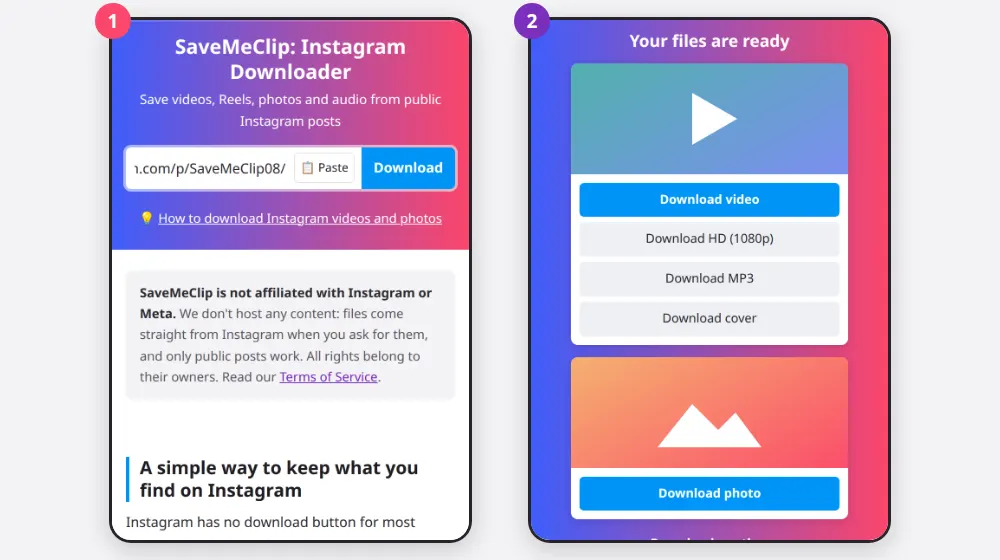
- Open Chrome and go to SaveMeClip.
- Tap Paste beside the box. Chrome may ask whether the site can see what you copied; allow it and the search starts by itself. If you'd rather not, press and hold the box, tap Paste, then tap Download.
- Wait a few seconds while the page says Looking for the files…
- In the list headed Your files are ready, tap the button you want.
- A message at the bottom of the screen and a notification follow the download. Tap Open when it's done.
Download in Samsung Internet
Samsung Internet, the browser that comes with Galaxy phones, follows the same steps. Progress shows in the notification panel, and the full list is in the menu (the three lines at the bottom right), under Downloads. Files go to the same Download folder as Chrome's, which you can open in My Files.
Firefox and other browsers work as well. Each one lists its downloads in its own menu, and most save to that same folder.
Find the file on your phone
Unless you've changed it, Android browsers save to the Download folder in internal storage. There are three quick ways to get there:
- From the browser: in Chrome, the menu (the three dots), then Downloads; in Samsung Internet, the menu, then Downloads.
- From your files app: open Files by Google, or My Files on a Samsung phone, and tap Downloads, or go to Internal storage › Download.
- By searching: every file from this site starts with savemeclip- and the post's code, so typing savemeclip in your files app finds them all.
Videos and photos usually appear in your gallery after a moment, in an album called Download. Google Photos shows it among the folders on your device, and Samsung Gallery under Albums. If one doesn't show up, open it once from your files app so the gallery notices it. MP3 files never appear in the gallery: music apps and the Audio section of your files app find them.
Which file to pick on Android
- Download video plays in any gallery and is easy to share to other apps. When in doubt, this is the one.
- Download HD, with its resolution in brackets, is sharper. It's put together as it downloads, so the notification can't show a percentage or a total size until it ends.
- Download MP3 keeps only the sound, at 192 kbps and a fraction of the video's size: handy for a talk or a lesson when storage is tight.
- Download photo and Download cover save a JPG.
Carousels show one card per slide, in the order of the post. Tap each button you want. Chrome may ask once whether SaveMeClip can download several files; allowing it lets the rest go through.
Fixing common problems on Android
- A download doesn't start. Check that the browser may download files for this site (in Chrome, Settings › Site settings › Automatic downloads) and that the phone has free space.
- A long download stops partway. A weak signal, or a switch between Wi-Fi and mobile data, can cut it. Downloads from SaveMeClip can't be resumed, so start again from the result list.
- The buttons stopped working. They expire two hours after the search. Tap Download another and paste the link again.
- It says the content isn't public. The post is from a private account, or the link is a story. SaveMeClip reads only what anyone can see without logging in, and Instagram shows Stories only to people who are logged in, so neither can be downloaded here.
- An HD or MP3 download is refused. Our server builds these two at a time for each visitor. Let one finish before starting another, or try again in a minute if the server is full.
- The video plays without sound. Raise the media volume, not only the ringtone. If the post is silent on Instagram as well, its music may have been removed. If it isn't, try Download HD, which brings the sound track separately.
- The video won't play. Some HD files use VP9, which a few older players don't read. Use the regular Download video file, or install a player such as VLC, which opens practically every format.
Skip the downloader apps
Apps that promise to save Instagram posts often ask for your Instagram login or for broad access to your phone, and some come from outside the Play Store. A web page can't read your files or your accounts, and SaveMeClip never asks for your password.
Save responsibly
Keep what you download for yourself unless you have permission. A Reel saved to watch later is fine; uploading it again as your own is not, and other platforms can mute or remove clips whose music was licensed only for Instagram. Credit creators and ask before reusing their work. If your content reached SaveMeClip without your consent, see our copyright page.