TikToks without the logo on top
When the creator allows it, TikTok's own Save video button gives you a copy with the TikTok logo and the author's name stamped on the picture. That's fine for sending to a friend, but not for a presentation, an edit or a clip of your own you want to post elsewhere.
SaveMeClip fetches the copy TikTok plays in its web player instead, which has no stamp. Paste the link, press Download and you get a clean MP4 on your phone or computer.
How to download a TikTok video
- In the TikTok app, open the video, tap Share (the arrow) and then Copy link. On a computer, copy the address of the video's page.
- Paste the link in the box at the top of this page and press Download.
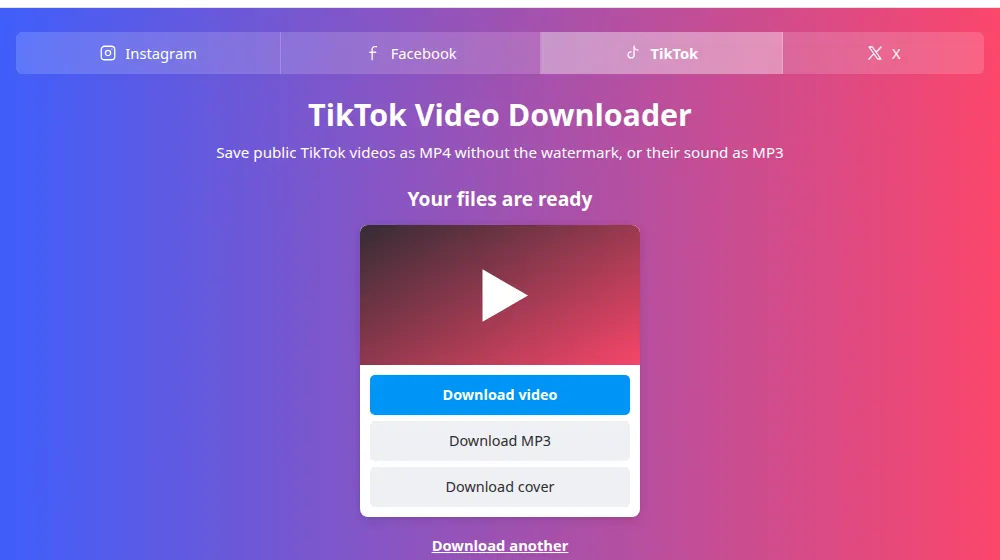
- Choose Download video for the MP4, or Download MP3 for the sound.
- Find the file in your downloads folder. Its name starts with savemeclip-tiktok, followed by the video's number.
Is it really without a watermark?
Yes, the stamp TikTok adds is left out. TikTok keeps more than one copy of each video: the one it streams to viewers, and the one its Save button makes, with the logo and the name. SaveMeClip only ever serves the first kind, and never the stamped one.
Anything the creator put in the video themselves, like captions, stickers or their own logo, is part of the picture and stays there.
What you get
- Download video: an MP4 with picture and sound, in the H.264 format whenever TikTok has it, which plays on any phone, computer or TV. Its resolution is the one TikTok streams on the web, which is sometimes lower than what the creator filmed.
- Download MP3: the sound of that video, voice and music as you hear them, converted to MP3 at 192 kbps.
- Download cover: the still image TikTok shows before the video plays.
Links that work, and posts that don't
Photo posts, the slideshows of pictures with music, can't be saved here: TikTok gives us their sound, but not the pictures. Private accounts and videos shared only with friends aren't public either. And TikTok hides some videos in some countries: if a video isn't shown in the country where our server is, you'll see a message saying so.
- Links like tiktok.com/@name/video/…, from the browser.
- Short links like vm.tiktok.com/… and vt.tiktok.com/…, which the app copies, and tiktok.com/t/…. SaveMeClip opens them on TikTok's own site only to find out which video they point to.
- Old mobile links like m.tiktok.com/v/….
Give credit to the creator
A clean copy makes it easy to forget whose work it is. Keep downloads for yourself, or ask before posting them, and name the creator when you do. Songs in TikToks are licensed to TikTok, not to you, so reposting one elsewhere can be taken down even with credit. To report a misuse of your own content, see our copyright page.
Frequently asked questions
Do the videos really come without the TikTok watermark?
Yes. We fetch the copy TikTok streams in its web player, which has no logo or username stamped on it, and we never serve the stamped copy of TikTok's Save button. Text or stickers the creator added are part of the video and stay.
Can I download TikTok photo slideshows?
Not for now. For a photo post, TikTok gives us only the sound and a cover, not each picture, so we show a message instead of an incomplete result. Videos work normally.
Why does it say the video isn't available in my region?
The message is about our server's region, not yours. TikTok doesn't show some videos in some countries, and when it refuses the country where our server is, we can't get the video. Only the creator or TikTok can change that.
Can I download from a private TikTok account?
No. SaveMeClip only reads videos that anyone can watch without logging in. Private accounts and videos shared only with friends stay private, and we have no way around that and no plan to add one.
Is the MP3 the full original song?
No. The MP3 is the sound of that video, exactly as it plays, with voice and music mixed. If the video uses a few seconds of a song, that's what you get. For the full song, look for it on a music service.
What quality are the downloads?
The same resolution TikTok streams on its website for that video. TikTok compresses uploads, so it may be lower than the original recording, and only the creator has the original file. We don't re-encode the video, so nothing is lost on our side.
Does the creator see that I downloaded their video?
No. Our server reads the public video the way a browser does, and nothing is sent to the creator. Remember that the video is still theirs, so ask before posting it anywhere.